
 Cart is empty
 If you’re a content creator, YouTuber, freelancer, or professional video editor, choosing the right laptop is one of the most important investments you can make. Video editing software like Adobe Premiere Pro, After Effects, DaVinci Resolve, and CapCut requires a powerful processor, dedicated graphics card, fast SSD storage, and sufficient RAM.
The good news? In 2026, you don’t need to spend over ₹1 lakh to get a capable editing laptop. There are several excellent laptops under ₹80,000 that offer smooth 1080p and even basic 4K editing performance.
In this guide, we’ll explore the 5 best laptops for video editing under ₹80,000 in 2026.
What Should You Look for in a Video Editing Laptop?
Before buying, make sure your laptop has:
- Processor: Intel Core i5/i7 H-series or AMD Ryzen 7
- Graphics Card: NVIDIA RTX 3050 or RTX 4050 (preferred)
- RAM: Minimum 16GB
- Storage: 512GB NVMe SSD
- Display: Full HD IPS with good color accuracy (100% sRGB preferred)
- Cooling: Efficient thermal design for long editing sessions
1. ASUS TUF Gaming A15
Best Overall Video Editing Laptop Under ₹80K
Specifications
- AMD Ryzen 7 Processor
- NVIDIA RTX 3050 Graphics
- 16GB DDR5 RAM
- 512GB SSD
- 15.6-inch Full HD 144Hz Display
Why Buy?
The ASUS TUF Gaming A15 remains one of the strongest choices for creators under ₹80,000. It combines a powerful Ryzen processor with dedicated RTX graphics, making timeline playback, rendering, and multitasking significantly smoother.
Pros
✅ Excellent editing performance
✅ Strong cooling system
✅ Upgradeable RAM & SSD
✅ Great battery life for its category
Cons
❌ Slightly heavy
2. Lenovo LOQ
Best Performance for Premiere Pro
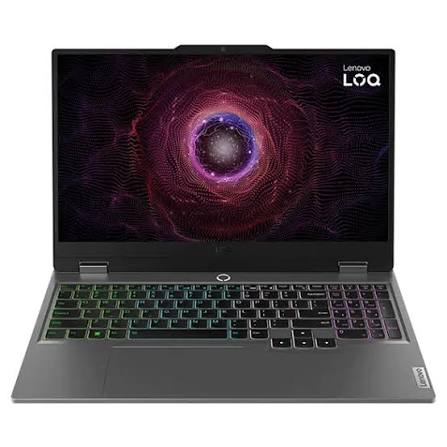
Specifications
- Intel Core i5 HX / AMD Ryzen HS Series
- NVIDIA RTX 3050 or RTX 4050 (depending on offers)
- 16GB RAM
- 512GB SSD
Why Buy?
Lenovo LOQ has quickly become one of the most recommended laptops for creators. The HX processor offers desktop-level performance, while the RTX GPU accelerates rendering in Premiere Pro and DaVinci Resolve. Community discussions also recommend choosing Ryzen-based variants over older Intel LOQ models where possible due to reported motherboard concerns on some earlier Intel batches.
Pros
✅ Fast rendering
✅ Excellent keyboard
✅ Upgrade-friendly
Cons
❌ Battery backup is average
3. HP Victus 15
Best Balanced Laptop
Specifications
- AMD Ryzen 7
- RTX 3050 / RTX 4050
- 16GB RAM
- 512GB SSD
Why Buy?
HP Victus offers excellent value for creators who also enjoy gaming. It performs well in Premiere Pro, Photoshop, Lightroom, and Blender while maintaining good thermals.
Pros
✅ Powerful CPU
✅ Reliable performance
✅ Comfortable keyboard
Cons
❌ Display colors could be better
4. Acer Nitro V
Best Budget Editing Laptop
Specifications
- Intel Core i5
- NVIDIA RTX 3050
- 16GB RAM
- 512GB SSD
Why Buy?
If your budget is closer to ₹70,000, the Acer Nitro V is one of the best options available. It offers dedicated RTX graphics and enough power for YouTube editing, Reels, Shorts, and freelance work.
Pros
✅ Affordable
✅ Dedicated GPU
✅ Good cooling
Cons
❌ Average speakers
5. ASUS Vivobook 16
Best Thin & Lightweight Laptop
Specifications
- Intel Core i7
- Intel Graphics
- 16GB RAM
- 512GB SSD
- 16-inch IPS Display
Why Buy?
Not everyone needs a gaming laptop. If your work mainly includes 1080p editing, social media videos, thumbnails, and basic After Effects projects, the Vivobook offers excellent portability with a large display.
Pros
✅ Lightweight
✅ Premium design
✅ Excellent display
Cons
❌ Not suitable for heavy 4K editing
Quick Comparison
| Laptop | Processor | GPU | Best For |
|---|---|---|---|
| ASUS TUF Gaming A15 | Ryzen 7 | RTX 3050 | Overall Performance |
| Lenovo LOQ | Intel HX / Ryzen HS | RTX 3050 / 4050 | Premiere Pro |
| HP Victus 15 | Ryzen 7 | RTX 3050 / 4050 | Balanced Editing |
| Acer Nitro V | Intel Core i5 | RTX 3050 | Budget Creators |
| ASUS Vivobook 16 | Intel Core i7 | Integrated | Beginners |
Which Laptop Should You Choose?
Choose ASUS TUF A15 if:
- You edit videos every day.
- You use Premiere Pro and After Effects.
- You also play games.
Choose Lenovo LOQ if:
- Rendering speed is your priority.
- You want the best value for money.
Choose HP Victus if:
- You want a balance between performance and design.
Choose Acer Nitro V if:
- Your budget is around ₹70,000.
Choose ASUS Vivobook if:
- You want a lightweight laptop for travel and everyday editing.
Final Verdict
For most video editors in 2026, a laptop with 16GB RAM, a fast SSD, and an NVIDIA RTX GPU provides the best experience. Across the sub-₹80,000 segment, the ASUS TUF Gaming A15 and Lenovo LOQ stand out as the strongest all-round choices thanks to their powerful processors, dedicated graphics, and upgrade options. Current buying guides for India continue to favor these kinds of gaming-class laptops for content creation because they offer the sustained CPU/GPU performance needed for Premiere Pro and DaVinci Resolve.
Whether you’re editing YouTube videos, Instagram Reels, cinematic films, or client projects, these laptops can handle professional workflows without exceeding your ₹80,000 budget.

Add a Comment